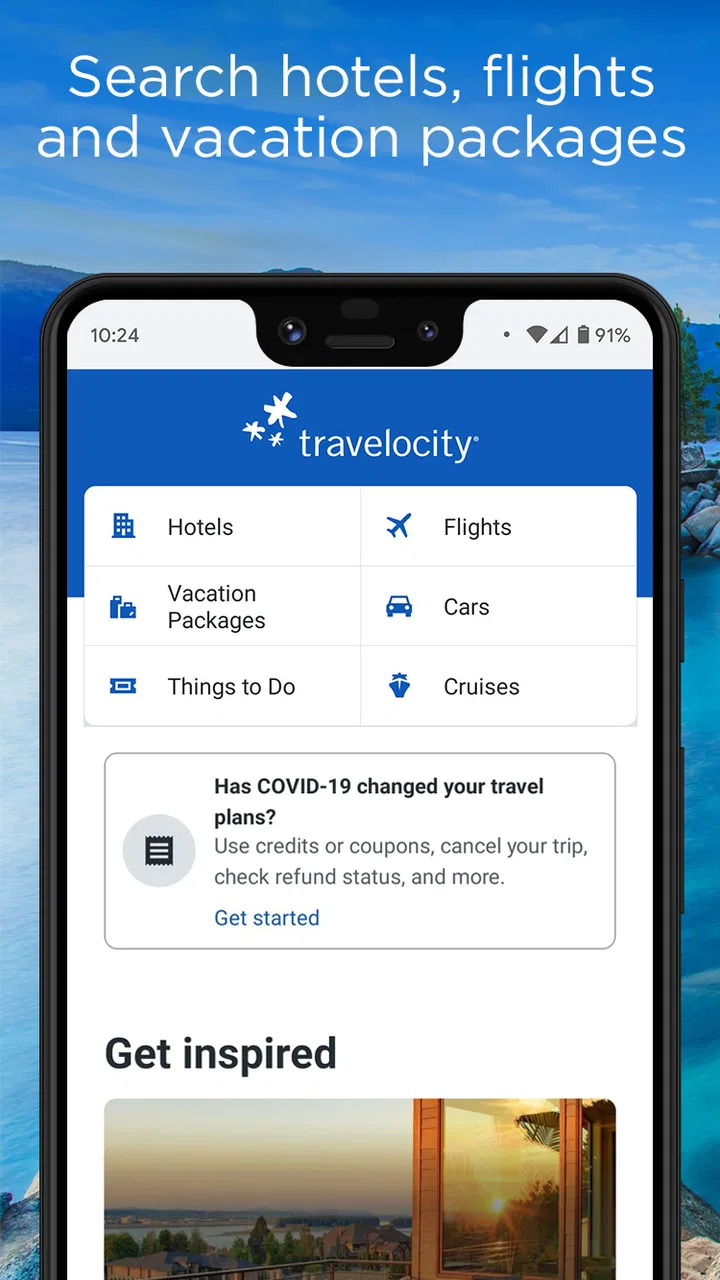
Travelocity Hotels & Flights
- 4.7
- Rating
- 5.00M
- Installs
- Free
- Price

 Analysis by App-foxy
Planning a trip can become unnecessarily complicated when flights, hotels, and changing travel details are spread across several services. I found Travelocity Hotels & Flights most useful as a practical starting point: it gives me a focused place to look for flight deals and book selected hotels without charging for the app itself. It is a Travel & Local app from Travelocity.com, and its straightforward purpose makes it easier to understand than broader travel apps that try to cover every part of a journey at once.
My first impression is that this is best treated as a search and booking companion rather than a complete travel-management system. I would open it when I already know roughly where I want to go and need to compare available flights or accommodation. The experience is especially comfortable for someone who wants to move from a vague idea such as “I need a hotel in this city” to a shortlist that can be inspected before making a decision.
Getting from installation to a useful travel search
I use the first search to turn a rough trip idea into a workable shortlist, rather than trying to settle every detail at once. Starting with one destination and a realistic date range also makes it easier to notice which trade-offs matter most—especially whether a flight’s timing fits the hotel plan. Next, I look at how to make that first search useful without mistaking a promising result for a finished decision.
You May Also Like

 Blood Strike: 2.5 Anniversary
Blood Strike’s Loadouts Turn Every Drop Into a Tactical Gamble
A close look at Blood Strike’s custom loadouts: how fast access to signature weapons reshapes its battle royale rhythm, rewards preparation, and narrows the gap between fights.

 Pandora - Music & Podcasts
Pandora’s Music Is Easy to Start, but Harder to Recover
Pandora’s strength is its low-effort path from a seed to a station. Its weak spot is how much confidence it asks you to place in connection, setup, and quiet recovery.

 8 Ball Pool
 Is Built on Rivalries, Rematches, and Routine
A close look at the rivalries, rematches, shared routines, and unanswered safety questions that turn a quick pool match into a persistent mobile community.

 Samsung Music
’s Quiet Strength Is Playing What You Already Own
Its reach comes less from spectacle than from dependable access to a personal library. That simplicity is both the app’s strongest retention engine and its ceiling.

 AccuWeather: Weather Radar
AccuWeather Review: A Quick, Clear Forecast for Everyday Decisions
For everyday plans, the best forecast is the one you can understand quickly. AccuWeather makes rain timing, radar, and local conditions easy to act on, with a few trade-offs.

 Hill Climb Racing
Why Hill Climb Racing Still Turns Crashes Into One More Run
A tiny car, a bumpy hill and one more upgrade: Hill Climb Racing keeps resurfacing because its simple chaos makes every near-miss feel personal.
More From Our News Desk
View All News


What to expect when you open the app
The app is free, carries an Everyone age rating, and has been available since June 30, 2011. That long presence matters in a small but practical way: this does not feel like a brand-new travel experiment that needs to explain its purpose from scratch. Its current version is 2026.22.0, and it requires operating system version 10 or newer, so I would check compatibility before planning around it on an older device.
The store summary points to the two central jobs: finding flight deals and booking select hotels. I would keep that wording in mind because it sets a useful expectation. The app is not something I would install expecting a universal directory of every possible accommodation or a full replacement for every airline’s own service. Its value is in bringing selected travel choices into one accessible search experience.
Its popularity also gives me some confidence when deciding whether it is worth trying. Travelocity Hotels & Flights has passed five million installs, with a 4.7 average from around 49 thousand ratings. Those figures do not guarantee that every search will suit my trip, but they suggest that the basic workflow has been useful to a substantial number of travelers.
Setting up without overcomplicating the first session
For a first-time user, I recommend starting with one concrete trip rather than browsing randomly. Choose a destination, decide whether you are checking flights or hotels first, and have approximate travel dates ready. This makes the first screen feel purposeful and helps you judge the app on something you genuinely need, rather than on a series of disconnected searches.
I would also avoid treating the first result as the final answer. Travel listings need context. A low-looking option may have a less convenient schedule, a different location, or conditions that make it less attractive once the full details are considered. My habit is to use the first search to understand the range, then narrow the choices by what actually matters to me: arrival time, location, length of stay, and the amount of flexibility I need.
One helpful mindset is to separate discovery from commitment. I can use the app to identify possibilities even when I am not ready to book immediately. That is particularly useful for a first-time traveler who is still learning whether a central hotel is worth the extra cost or whether an early flight would make the whole day harder. The app becomes more useful when I treat it as a decision aid instead of pressing toward a booking too quickly.
Your first successful action: make one focused search
The clearest first success is finding a realistic flight or hotel option that fits the trip rather than merely opening a listing. I would begin with a simple route or destination and enter dates carefully. Once results appear, I would read the details of several options and compare them side by side in my own notes if necessary. This small habit prevents the familiar mistake of choosing the first acceptable result and discovering later that another option suited the itinerary better.
For flights, I pay attention to the practical shape of the journey, not only the displayed deal. A cheaper fare can be a poor choice if its timing creates a difficult connection or forces an inconvenient arrival. Travelocity is useful here as an initial comparison point, but I still want to understand what I am selecting before I move forward. A travel search is successful only when the result works in real life.
For hotels, I would inspect the location with the rest of the trip in mind. A room that looks attractive in isolation may be awkward if I need to reach an airport, a conference venue, or several attractions. When I use this app, I think of the accommodation as part of the daily route. That approach is more reliable than judging a hotel solely by its headline appeal.
A realistic example would be a weekend visit planned after a busy workweek. I might search for the flight first, notice that the cheapest choice arrives late, and then compare hotels based on how easy it will be to reach them at that hour. Alternatively, I might start with a hotel near the area I need and then search flights whose arrival times make check-in practical. The important point is that the app supports this back-and-forth planning, while the final choice still depends on the whole itinerary.
How to avoid the most common confusion
The biggest potential misunderstanding is assuming that every travel possibility will appear with identical depth. The app focuses on flight deals and selected hotels, so I would not interpret a limited result set as proof that a destination has no alternatives anywhere. If I need an unusually specific property, a niche lodging type, or a route that is difficult to serve, I would compare the results with another travel service or the provider’s own channel.
Another point that deserves care is the difference between discovering an option and completing a reservation. Seeing a flight or room in a search result is not the same as having a confirmed booking. I always read the final details, check the dates and traveler information, and look for the conditions attached to the choice before considering the process finished. This is ordinary travel caution, but it is especially important when an app makes browsing feel quick.
I also would not assume that the most prominent result is automatically the best value. A useful comparison includes timing, location, and suitability, not just the first visible amount. For a hotel, the surrounding area may save or cost time every day. For a flight, the schedule may matter more than a small difference in fare. The real advantage is clearer comparison, not blind acceptance of the first deal.
Some users may wonder whether they need this app if they already use an airline or hotel app. In my view, the answer depends on the stage of planning. A provider-specific app can be better once I have already chosen an airline or property and want direct account tools or brand-specific information. Travelocity is more helpful earlier, when I am comparing possibilities across a trip rather than managing one established booking relationship.
Three practical habits that make the app more useful
- Search around your preferred schedule: I check whether a slightly different departure or arrival time produces a more comfortable trip before deciding that the first price is a bargain.
- Judge hotels by the daily route: I consider how the property fits the places I need to visit, not only how it looks in the listing.
- Use a second review pass before booking: after finding a promising option, I reread the dates, destination, and traveler details from the beginning so a small input mistake does not become a large travel problem.
These habits are not flashy features, but they are where I see the most practical benefit. Travel apps often make searching easy and decision-making rushed. Slowing down for one deliberate comparison gives Travelocity a more meaningful role in the planning process.
Where it fits among the usual travel alternatives
Compared with searching directly through an airline, Travelocity is more useful when I have not yet committed to a particular carrier. Direct airline apps can be the better choice for managing an existing reservation or checking information tied closely to one airline. I would use Travelocity earlier, when I want to explore flight possibilities before settling on a provider.
Compared with a hotel chain’s own app, it offers a broader starting point for people who are not loyal to one brand. A chain app may be preferable when I already know the property I want or regularly use that chain. Travelocity makes more sense when the destination comes first and the accommodation is still open for comparison.
Compared with a general web search, a dedicated travel app feels more focused. I am not sorting through unrelated pages or trying to turn scattered information into a shortlist. The trade-off is that I should not expect the app alone to answer every question about a complicated itinerary. For unusual routes, special accommodation requirements, or highly flexible multi-stop plans, I would combine it with direct research rather than rely on one source.
Who will appreciate it, and who should skip it
I think the app suits first-time travelers, occasional vacation planners, and anyone who wants a simple place to begin comparing flights and selected hotels. It is also convenient for people who prefer doing travel research on a phone rather than opening several browser tabs. The free price makes it easy to test without making the installation itself part of the travel budget.
I would be more cautious about recommending it as the only tool for travelers with complicated requirements. If I need very specific accessibility information, an unusual lodging arrangement, a complex multi-city journey, or detailed management of an existing reservation, I would verify everything through the relevant provider as well. The app can start the process, but it should not replace judgment where the details are highly personal or consequential.
It may also be a weaker fit for someone who already knows exactly which airline or hotel they want. In that case, going directly to that provider may reduce an extra step. Travelocity earns its place when comparison is useful; it is less necessary when the decision has already been made.
What I would do after the first booking search
Once I have completed a useful search, I would save my preferred details outside the app in a simple itinerary note: destination, dates, chosen schedule, and hotel location. This gives me a quick reference while I continue comparing and helps me notice changes in my own plan. I would then return to the app only when I have a specific question or a revised option to evaluate, rather than repeatedly browsing without a decision framework.
If I am traveling with another person, I would share the actual details that affect them, especially timing and location, instead of sending only a screenshot of the attractive part of a listing. That small step reduces misunderstandings about arrival times or where the hotel is situated. It also makes the app’s search results more useful in a real conversation about the trip.
Before finalizing anything, I would confirm that the dates match the rest of the itinerary and that the selected option still makes sense for the journey. I would not let a tempting deal override an inconvenient schedule. This is where my opinion of the app becomes balanced: it can shorten the path to a promising option, but it cannot decide whether that option is sensible for my particular trip.
My final take on Travelocity Hotels & Flights
After using it as a travel-planning tool, I see Travelocity Hotels & Flights as a convenient first stop for comparing flight opportunities and selected hotel bookings. Its purpose is easy to grasp, the free entry point removes friction, and the experience is most valuable when I have a destination in mind but have not yet chosen the exact flight or property.
The developer, Travelocity.com, has built an app with a clear everyday role rather than an overwhelming collection of travel extras. I like that I can begin with one practical question—how can I get there, or where should I stay?—and turn that into a manageable shortlist. The app’s 4.7 average from about 9 thousand reviews adds another sign that many users find the experience worthwhile, although my own final decision would still depend on the details of each trip.
My recommendation is simple: install it if you want a focused way to begin travel research and are willing to verify the final choice carefully. Use it to compare, question, and narrow down options. Choose a direct airline or hotel app when you already know the provider or need provider-specific management. For a first-time user, that distinction makes the path much clearer: start with a focused search, inspect the practical details, and only then decide whether the result deserves your booking.
FAQs for Travelocity Hotels & Flights
01What features does the Travelocity Hotels & Flights app offer?
The Travelocity app provides a seamless experience for booking hotels, flights, rental cars, and vacation packages. Users can explore exclusive deals, create itineraries, and receive real-time alerts on price changes and flight updates. The app also offers a robust search function, allowing users to filter options based on personal preferences and budget.
02Is the Travelocity app available for both Android and iOS devices?
Yes, the Travelocity Hotels & Flights app is available for both Android and iOS platforms. You can download it from the Google Play Store for Android devices and the Apple App Store for iOS devices. The app is designed to offer a smooth and intuitive interface across all supported devices.
03How reliable are the reviews and ratings on the Travelocity app?
The reviews and ratings on the Travelocity app are contributed by real users who have booked their travel through the platform. These reviews provide insights into the quality of accommodations, flights, and other services, helping potential travelers make informed decisions. Travelocity also takes steps to ensure the authenticity of the feedback provided.
04Does the Travelocity app offer customer support for booking issues?
Yes, the Travelocity app includes customer support features to assist with any booking issues. Users can access support through the app via chat, email, or phone. The support team is available 24/7 to help resolve any concerns related to bookings, cancellations, or changes to travel plans.
05Are there any fees associated with using the Travelocity app?
Downloading and using the Travelocity app is free. However, like many travel booking platforms, there may be service fees associated with certain bookings, such as flight changes or cancellations. It’s important to review the terms and conditions of each booking to understand any potential fees.
Pros
- User-friendly interface enhances booking experience.
- Comprehensive search filters for tailored results.
- Access to exclusive deals and discounts.
- Multi-platform support for Android and iOS.
- 24/7 customer support for immediate assistance.
Cons
- Occasional app crashes disrupt user experience.
- Limited payment options available.
- Some features require stable internet connection.
- Pop-up ads can be intrusive during searches.
- Limited offline functionality for trip management.

Travelocity Hotels & Flights
Gallery